The only POS in Spain with 100% AI migration

Migrate your POS in minutes, not weeks.

Upload CSV, Excel, PDFs or photos exported from your previous POS. Our AI extracts products, categories, customers, suppliers and historical sales with no templates, no touching Excel, no macros. You review, confirm and start selling.

No card · Permanent free plan · Import included in any paid plan

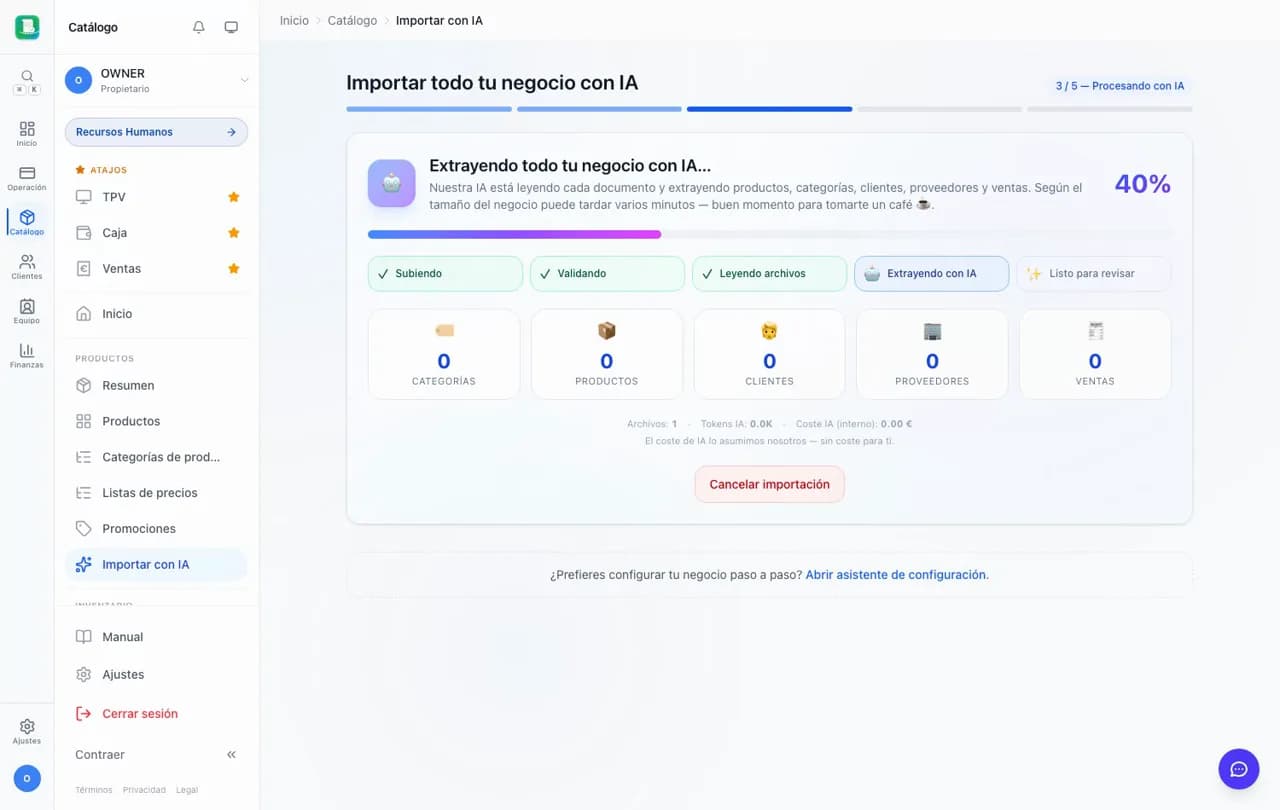
FactuTPV AI catalog importer processing heterogeneous files

1-15 min

Average migration time

50 MB

Up to 20 files per import

€0

Cost to you — AI paid by FactuTPV

5 entities

Products, customers, suppliers and more

Differentiator

The only Spanish POS that migrates with generative AI.

We researched 14 Spanish and 5 international competitors in April 2026. None has an AI catalog importer able to read arbitrary formats and extract products + customers + sales. Most still require rigid Excel templates with columns in exact order.

Glop

ES

Mandatory Excel template with columns in exact order. Resellers ask support for the template.

Sage 50 / Sage TPV

ES

Preconfigured base guides. Manual CSV template.

Loyverse

International

Create a sample product, export it, fill in the CSV manually.

Holded

ES

"If you modify a column or its position, Holded won't be able to read the file."

SumUp POS

ES

Fill in the rigid import CSV template.

Square

USA

AI Menu Generator only in the USA and only for restaurants (QSR). No retail importer.

Lightspeed

International

"Lightspeed AI" announced in 2025 with no catalog importer delivered.

TPV Online / Téctil / Pixsell

ES

Manual CSV. No documented AI importer.

FactuTPV

Importer with generative AI (Anthropic Claude). Reads arbitrary formats with no templates. Extracts products + categories + customers + suppliers + historical sales in a single pass. The only Spanish POS with this capability in 2026.

How it works

Four steps. Fifteen minutes. Zero manual Excel sheets.

01

Export whatever you have from your old POS

The format doesn't matter: CSV, Excel, PDF, catalog photos, screenshots, a ZIP with everything mixed together or a Word doc with notes. The AI understands context, it doesn't need columns in a specific order or templates.

02

Upload the files to the wizard

Drag up to 20 files (50 MB in total). The AI (Anthropic Claude) processes them automatically. It takes between 1 and 15 minutes. You can close the tab without losing anything — when you come back, we'll take you straight to the result.

03

Review in the preview

You see everything extracted: products, categories, customers, suppliers and sales. You edit inline whatever you want, discard what you don't, and we validate tax IDs and VAT rates against Spanish fiscal rules.

04

Confirm and start selling

You click «Import» and FactuTPV creates everything in your account. Historical sales are marked as informational (not sent to AEAT) and go into your VAT Ledger. You're ready to sell.

What gets imported

Your entire business, not just products.

Most competitors let you import products. FactuTPV imports five entities in a single pass — and links them to each other (which customer bought what, supplier of which product).

Categories

With hierarchy if detected

Products

SKU, barcode, VAT, stock, price

Customers

Tax ID, address, email, phone

Suppliers

Tax ID and fiscal data

Historical sales

Informational for your VAT Ledger

Accepted formats

Upload whatever you have. No templates.

CSV from your previous POS, personal Excel sheets, PDF invoices, catalog photos, screenshots, ZIPs with everything mixed together, Word with notes. The AI understands the context.

CSV / Excel

Native PDF

Scanned PDF

JPG / PNG / HEIC

Word (.docx)

ZIP with a mix

Up to 50 MB in total and 20 files per import. Enough for a mid-sized retailer with thousands of products and sales. If your business is very large, contact us: we'll process it in batches via assisted manual import at no extra cost.

Guarantees

A worry-free migration. No surprises.

Spanish fiscal validation

Tax ID, VAT at {0, 4, 10, 21}%, IRPF, IGIC, IPSI, consistent amounts. If the AI detects something impossible, it discards it and explains why.

Triple-gate safety

Each extraction passes through schema validation + legal rules + mathematical reconciliation before it can be inserted. Garbage never gets in silently.

Resumable and reversible

Close the tab without worry. Edit or discard any product in the preview. After importing you can delete entity by entity or request a reset.

Sales are not sent to AEAT

Migrated historical sales are marked as informational for your VAT Ledger. They don't enter VeriFactu, they don't affect your compliance.

Data encrypted and deleted

Your files are stored encrypted and deleted after 30 days. Anthropic does not train models on your data (enterprise API policy). GDPR compliant.

AI cost covered by us

Up to €5 of AI cost per import, paid by FactuTPV. If an exceptional case exceeds the cap, we move it to assisted manual import — always free for you.

Stop fighting with Excel templates.

FactuTPV migrates your POS with AI. Start free and, whenever you want, launch the import with one click. No cost, no risk.

Frequently asked questions

What others ask before migrating.

Which previous POS systems are compatible?

All of them. Since the AI understands context with no templates, you can migrate from Glop, Sage 50/TPV, Loyverse, Holded, Anfix, Cuentica, Téctil, TPV Online, Square, SumUp, Pixsell, Rivo, Hostench, Ágora, Ofipro, Quaderno, ContaPyme, ContaSimple, ContaPlus, FacturaScripts and any personal Excel sheet. The export format of your previous POS doesn't matter — upload whatever you have.

How much does it cost?

Free for you. We cover the cost of the AI (Anthropic Claude). Every business has one import included in all paid plans.

Which entities does it import exactly?

Products (SKU, barcode, VAT, stock, price), categories (with hierarchy if present), customers (tax ID, address), suppliers (tax ID and fiscal data) and historical sales (informational, not sent to AEAT). Other POS systems only allow products. FactuTPV imports everything in a single pass.

Are historical sales sent to AEAT?

No. Previous sales are marked as «imported» and stored only for your VAT Ledger. They are not sent to VeriFactu, they don't enter the SHA-256 chain and they don't affect your fiscal compliance. Only sales you issue from FactuTPV are sent to AEAT in real time.

How long does the import take?

Between 1 and 15 minutes depending on size and formats. Excel with 200 products < 2 min. A ZIP with several scanned PDFs of 500+ products can take 10-15 min. You can close the tab without worry: the result is waiting for you when you return.

What does the AI do if it finds incomplete or invalid data?

Before inserting, it validates each field against Spanish fiscal rules (tax ID, VAT at {0, 4, 10, 21}%, IRPF, IGIC, IPSI, consistent amounts). In the preview you see the errors highlighted and you correct them by hand. If a sale has impossible data, it's discarded with an explanation. Garbage is never inserted silently.

Why is FactuTPV the only Spanish POS with this?

Integrating modern generative AI into a Spanish fiscal flow requires specific validation (tax ID, regimes, RD 1007/2023) and triple-gate safety to avoid hallucinations. Most POS systems still require rigid Excel templates. Square has AI but only in the USA and for QSR. Lightspeed announced it without delivering. FactuTPV was the first in Spain, in 2026.

Can I undo the import if I don't like it?

Yes. (1) In the preview you individually discard any entry before confirming — only what you accept gets inserted. (2) After importing, you can delete entities one by one from the catalog or request a full reset from Support. AI import is reversible.

Is it safe? Does Anthropic keep my data?

The files are sent only to extract structured information. Anthropic does not train models on that data (enterprise API policy). FactuTPV stores the files encrypted for 30 days and then deletes them. GDPR and LOPDGDD compliant.

Does it work if the files are in another language or currency?

It works with Spanish, English, Catalan, Galician, Basque and other languages. The currency is normalized to EUR (the only one supported in Spain). If the prices came in another currency, the preview warns you and lets you confirm the conversion before importing.

Is it available on the free plan?

No. It's included only after your first Stripe payment (any paid plan). This is how we ensure that the AI cost — which we cover — is offset by customers who stay. During the 14-day trial you see the CTA but it doesn't run.

Ready to migrate?

Create your free account. When you're ready and subscribe to any plan, you launch the AI import with one click.

You'll also read: VeriFactu fiscal engine · Full manual · Blog